

ToolsDesktop appIn development
Vitool Box
All the apps in one place. Turn one on and it installs; turn it off and it is gone.
Vitool Box and its apps run on Windows 10 and 11. Open this page on your PC to install. Or download the installer anyway · 2.3 MB.
Overview
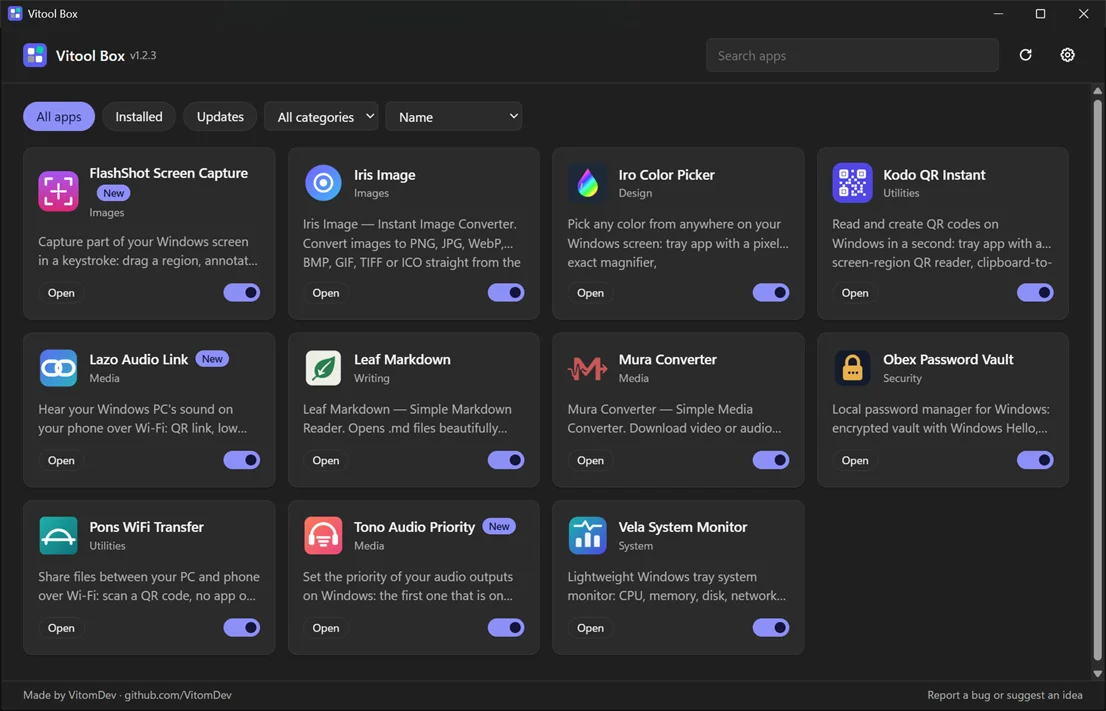
Every app on this site in one place. Browse them, read what each one does, and turn on the ones you want. Vitool Box downloads, checks and installs them, keeps them updated and can group their tray icons into one.
Vitool Box reads the same catalog as this site, so every app here is one switch away. It can start with Windows, wait in the notification area and let you know when updates are ready.
What it does
Turn apps on and off
On downloads and installs the app; off uninstalls it. No setup wizards.
One-click updates
Update one app from its card, or all of them at once. New apps show up on their own.
Safe downloads
Only official releases, each checked against its SHA-256 checksum before it runs.
One tray icon
Optionally group your apps' icons into a single Vitool Box icon next to the clock.
Version history
Read every release's notes and go back to an older version if a new one gives you trouble.
Settings backup
Save your apps' settings to a file and restore them later or on another PC.
Ten languages
English, Spanish, Brazilian Portuguese, French, German, Italian, Polish, Japanese, Korean and Simplified Chinese.
Install
Download
VitoolBoxSetup.exefrom the latest release and run it.- Per-user install, no admin rights needed.
- Uninstalling Vitool Box keeps the apps you installed with it.


