Free apps for Windows 10 and 11

Small apps for the gaps in Windows.

Free, open-source tools by Vitom. Each one does a single job well, then gets out of your way. No accounts, no telemetry.

Download Vitool Box2.3 MBBrowse the apps

Install Vitool Box once, then turn any app on or off with a switch. It keeps them all up to date. What is Vitool Box?

Vitool Box and its apps run on Windows 10 and 11. Open this page on your PC to install. Or download the installer anyway · 2.3 MB.
Up close

One app at a time. Swipe, use the arrows or pick an icon.

  • Design · Tray app

    Iro Color Picker

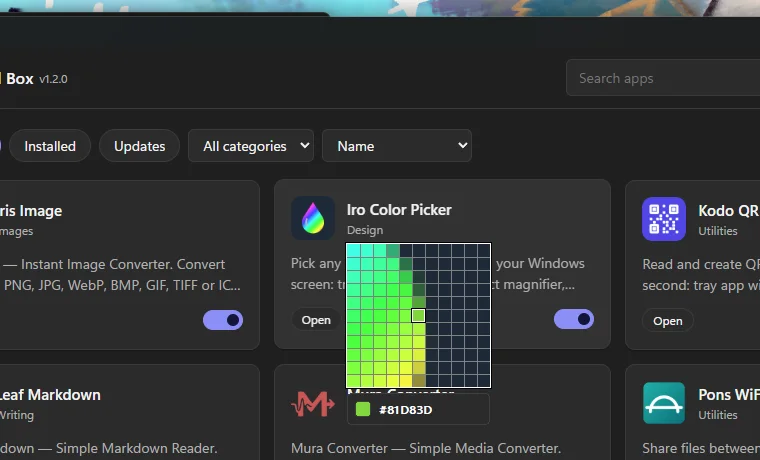
    Pick any color from anywhere on your screen with a pixel-exact magnifier.

    • Pixel-exact picking. A magnifier follows your pointer over a frozen copy of the screen. Zoom with the mouse wheel and move one pixel at a time with the arrow keys.
    • The format you need. HEX, RGB, HSL, HSV, CMYK or plain R, G, B. Choose the default and the magnifier shows it as you go.
    • Recent colors. Your last 24 colors in the tray menu and in the Colors window.
    Idle CPU (60 s)
    0 ms
    Idle memory
    0.5 MB working set
    Pick a color
    CtrlAltC
    3 releases
    v1.0.2 · Nov 23, 2026

    Or download Iro on its own · v1.0.2 · 2.2 MB

    Vitool Box and its apps run on Windows 10 and 11. Open this page on your PC to install. Or download the installer anyway · 2.3 MB.
    Iro's magnifier enlarging the pixels under the pointer on top of another window, with the picked color shown in HEX
    Video coming soon
  • Images · Tray app

    FlashShot Screen Capture

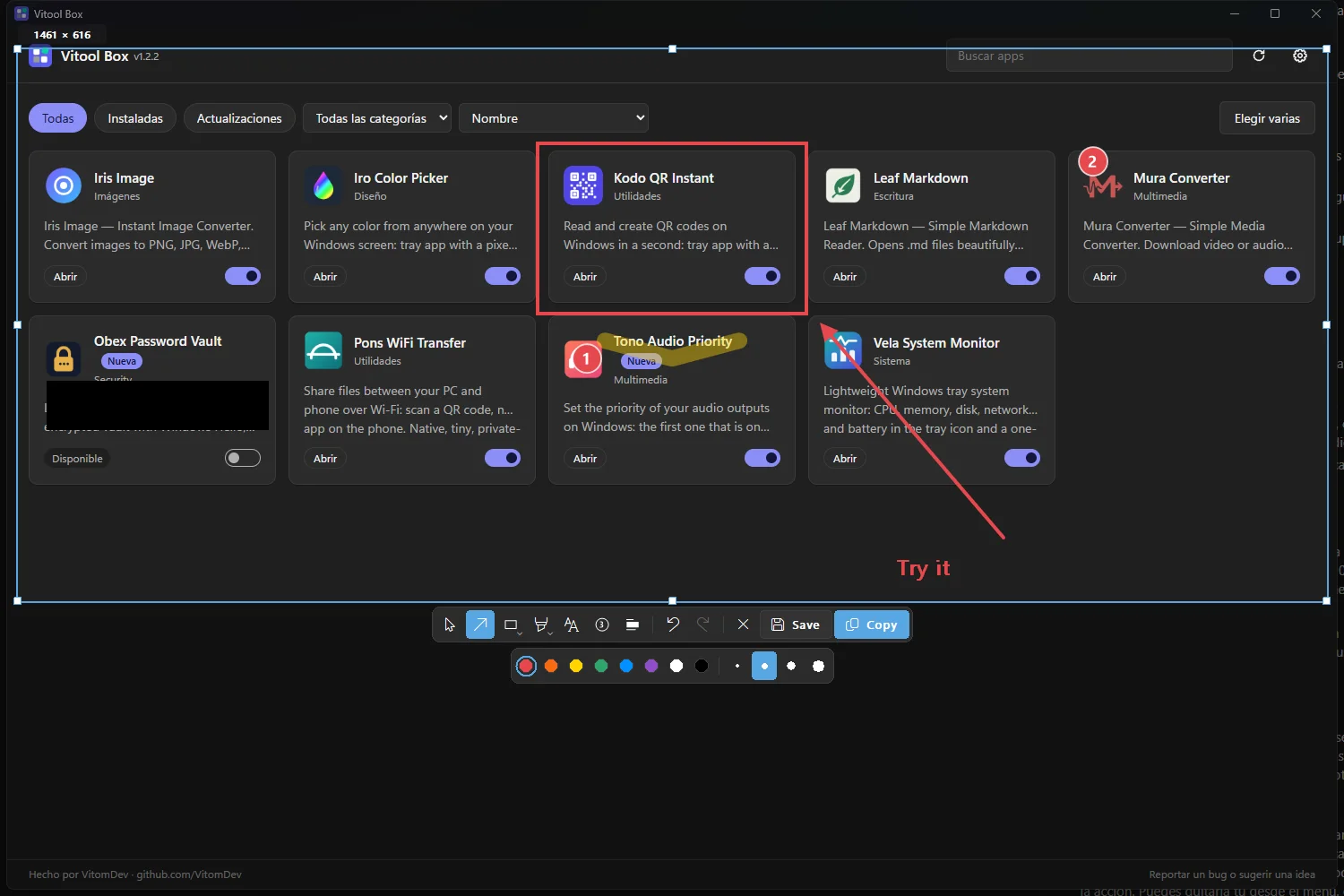
    Capture part of your screen in a keystroke, mark it up and copy or save it.

    • One shortcut from any app. Print Screen by default, even on Windows 11 where it normally opens the Snipping Tool. Change it in Settings.
    • A frozen screen. The desktop is captured first, so videos and animations stop while you select.
    • Precise regions. Drag in any direction, resize from corners and edges, nudge one pixel at a time with the arrow keys and read the live size in pixels.
    New capture
    Print Screen
    4 releases
    v1.0.3 · Nov 23, 2026

    Or download FlashShot on its own · v1.0.3 · 2.2 MB

    Vitool Box and its apps run on Windows 10 and 11. Open this page on your PC to install. Or download the installer anyway · 2.3 MB.

    FlashShot over a frozen screen with a selected region, an arrow and a red box drawn on it, and the annotation toolbar below
    Video coming soon
  • Media · Tray app

    Lazo Audio Link

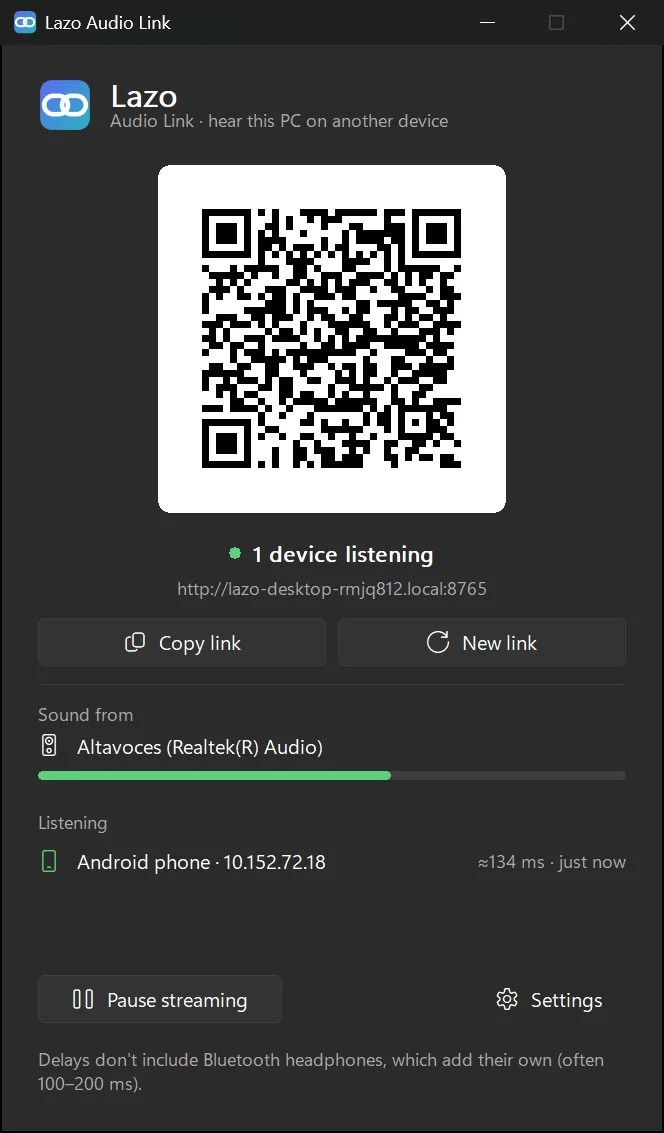
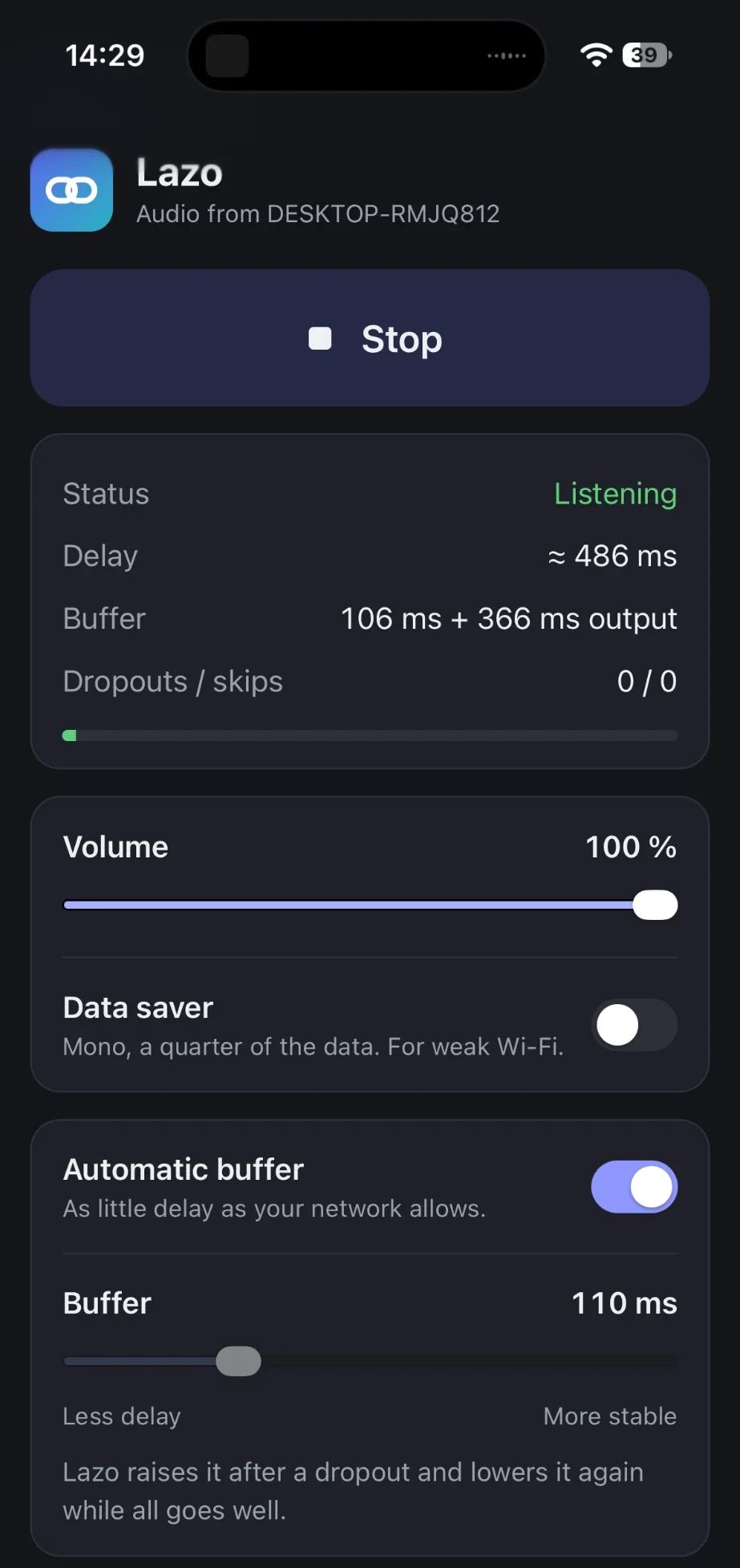
    Hear your PC's sound on your phone over Wi-Fi, with about a tenth of a second of delay.

    • Everything the PC plays. Lazo records what goes to your speakers, or any output you choose, and sends it in stereo.
    • Or just one app. Send only the browser with your video, without notifications, calls or system sounds.
    • Scan and listen. A QR code with the PC's address opens in Safari on iPhone or Chrome on Android. On a laptop or tablet, open the link.
    CPU while streaming to one device
    about 1.5 % of one core
    CPU while waiting
    0 ms over 60 s
    5 releases
    v1.1.1 · Nov 23, 2026

    Or download Lazo on its own · v1.1.1 · 2.4 MB

    Lazo runs on your Windows PC; your phone only needs to open its link to listen. Open this page on your PC to install. Or download the installer anyway · 2.3 MB.

    Lazo's window on the PC with a QR code to scan, one Android phone listening and the sound source set to the speakersLazo's page on a phone while listening, showing delay, buffer, volume, data saver and automatic buffer controls
    Video coming soon
  • System · Tray app

    Vela System Monitor

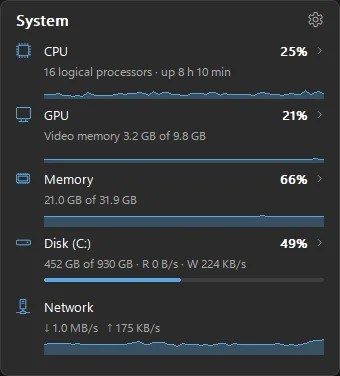
    CPU, GPU, memory, disk, network and battery in your tray, without opening Task Manager.

    • Tray icon. The Vela logo, or the live CPU or memory percent as a number.
    • Panel. A Windows 11 style flyout with every metric, a level bar and its recent history.
    • Top processes. Click CPU, GPU, Memory or Disk to see the 10 apps using the most, then end one or find its file.
    12 releases
    v1.5.5 · Nov 23, 2026

    Or download Vela on its own · v1.5.5 · 2.1 MB

    Vitool Box and its apps run on Windows 10 and 11. Open this page on your PC to install. Or download the installer anyway · 2.3 MB.
    Vela's panel showing CPU at 25 percent, GPU at 21 percent, memory at 66 percent, disk usage and network speed, each with a history graphVela's numbers on the Windows taskbar next to the clock, showing CPU, GPU and network speeds
    Video coming soon
  • Images · Explorer menu

    Iris Image

    Convert images to PNG, JPG, WebP and more straight from the File Explorer right-click menu.

    • Seven formats. Converts to PNG, JPG, WebP, BMP, GIF, TIFF and ICO.
    • Native context menu. The modern menu on Windows 11 and the classic menu on Windows 10.
    • Whole selections at once. Converts many images in one go, using up to four threads.
    3 releases
    v1.0.2 · Nov 23, 2026

    Or download Iris on its own · v1.0.2 · 2.4 MB

    Vitool Box and its apps run on Windows 10 and 11. Open this page on your PC to install. Or download the installer anyway · 2.3 MB.
    Video coming soon
  • Utilities · Tray app

    Kodo QR Instant

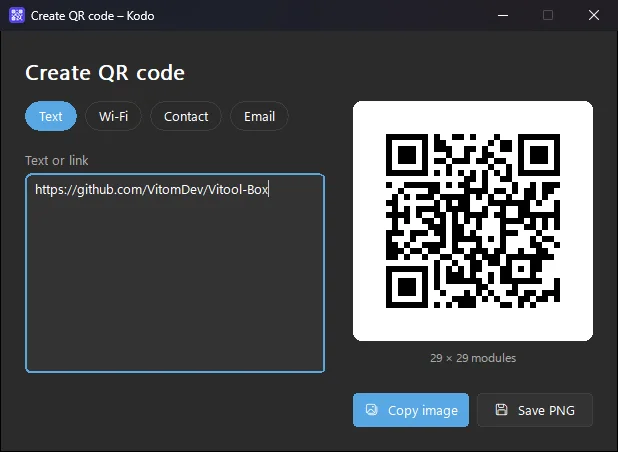
    Read a QR code from anywhere on your screen, or turn your clipboard into one.

    • Read any on-screen code. Select an area and a small card shows what the code holds. Several codes in the selection? Step through them.
    • Safe links. Short links, look-alike addresses, bare IPs and unencrypted links get a warning before they open.
    • Wi-Fi, contacts and more. See a network's name and password, emails, phone numbers, text messages, contacts and locations.
    Idle CPU (60 s)
    0 ms
    Idle memory
    0.6 MB working set
    Read a QR code on screen
    CtrlShiftQ
    5 releases
    v1.2.2 · Nov 23, 2026

    Or download Kodo on its own · v1.2.2 · 2.6 MB

    Vitool Box and its apps run on Windows 10 and 11. Open this page on your PC to install. Or download the installer anyway · 2.3 MB.

    Kodo's Create QR code window with a link typed in and its QR code generated next to it, with Copy image and Save PNG buttons
    Video coming soon
  • Utilities · Tray app

    Pons WiFi Transfer

    Move files between your PC and any phone, tablet or computer over Wi-Fi.

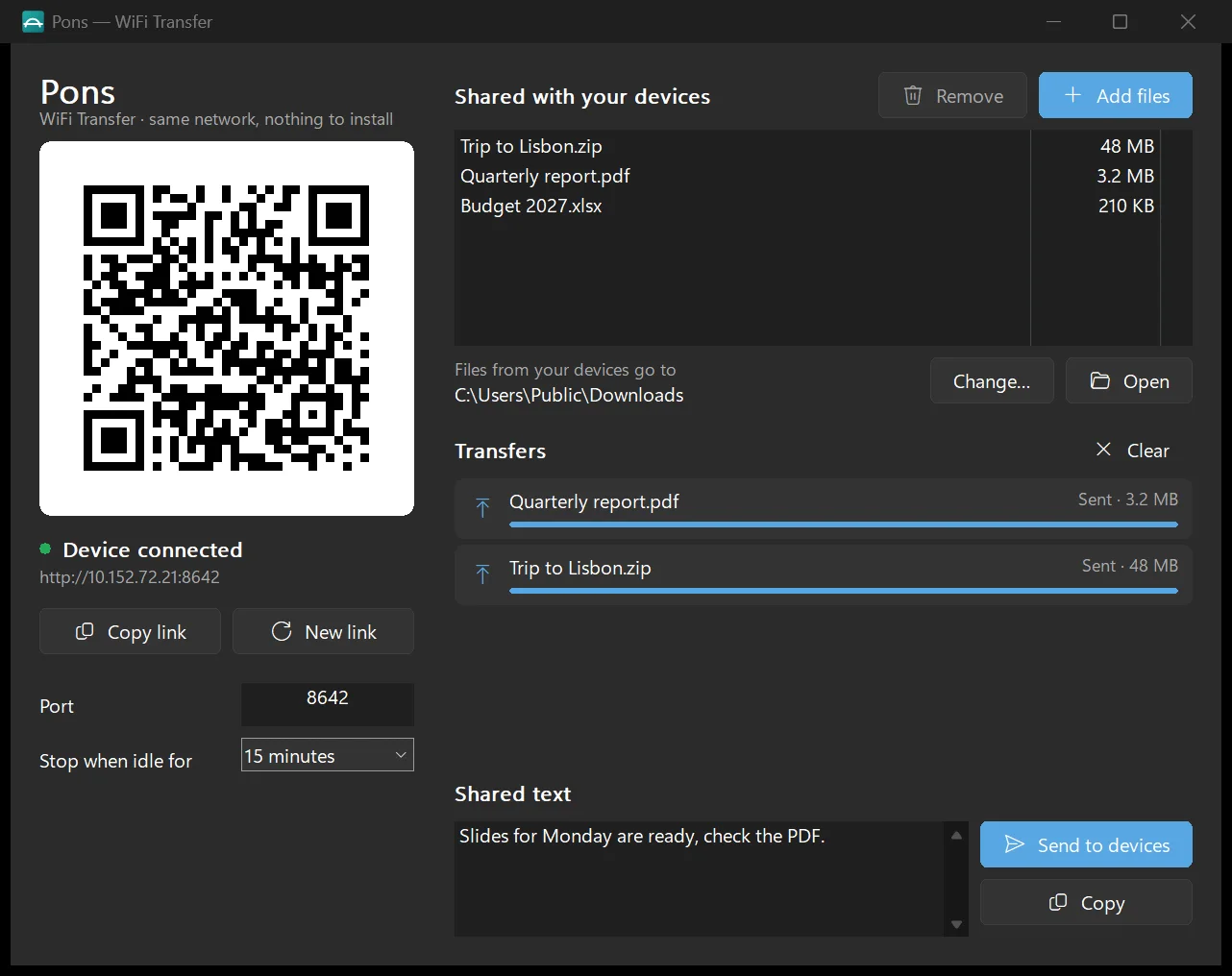
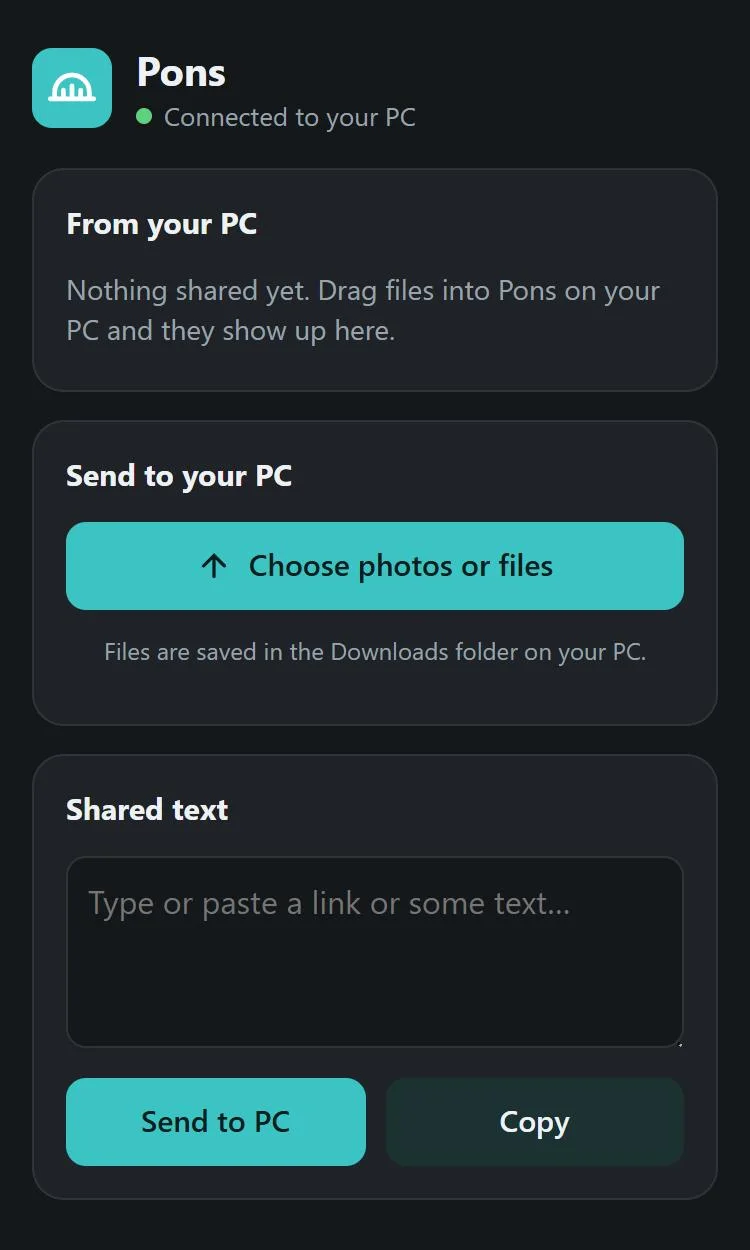
    • Scan and go. A QR code with the PC's address opens in any phone camera, on iPhone and Android, or copy the link to another computer.
    • PC to device. Drag files or a folder into Pons and download them on the other device.
    • Device to PC. Send several photos or files at once, each with its own progress bar, to Downloads or any folder you choose.
    4 releases
    v1.1.1 · Nov 23, 2026

    Or download Pons on its own · v1.1.1 · 2.3 MB

    Pons runs on your Windows PC; your phone only needs to open its link to send or receive files. Open this page on your PC to install. Or download the installer anyway · 2.3 MB.

    Pons on the PC with a QR code, a connected device, files shared with devices, transfers in progress and a shared text boxPons' page on a phone with sections to download files from the PC, send photos or files to it, and share text
    Video coming soon
  • Media · Tray app

    Tono Audio Priority

    Put your audio outputs in order; the first one that is on becomes the default.

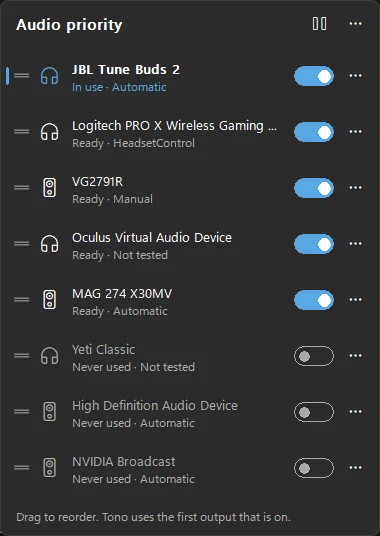
    • Priority list. Drag your outputs into order. The first one that is on becomes the default.
    • Follows what Windows sees. Bluetooth earbuds going into their case, USB headsets unplugged, monitors turned off.
    • Wireless USB headsets. Headsets that stay connected while switched off can be asked directly through HeadsetControl, downloaded only if you want it.
    5 releases
    v1.0.4 · Nov 23, 2026

    Or download Tono on its own · v1.0.4 · 2.2 MB

    Vitool Box and its apps run on Windows 10 and 11. Open this page on your PC to install. Or download the installer anyway · 2.3 MB.
    Tono's audio priority list with Bluetooth earbuds in use at the top, followed by a wireless headset, monitors and other outputs with switches
    Video coming soon
  • Media · Desktop app

    Mura Converter

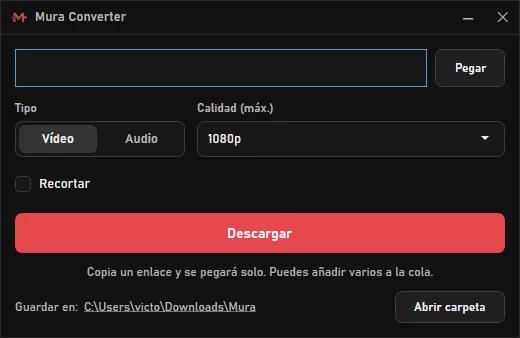
    Paste a link and download the video or just the audio, in the format you need.

    • Video or audio. MP4, MKV or WebM up to 4K, or MP3, M4A, Opus and lossless WAV.
    • Preview first. Thumbnail, title, channel and duration before you download.
    • Queue and playlists. Paste several links in a row, or a whole playlist into its own numbered folder.
    3 releases
    v2.3.1 · Nov 23, 2026

    Or download Mura on its own · v2.3.1 · 123 MB

    Vitool Box and its apps run on Windows 10 and 11. Open this page on your PC to install. Or download the installer anyway · 2.3 MB.

    Mura Converter's compact window with a link field, video or audio selector, quality menu and download button
    Video coming soon
  • Tools · Tray app

    Vara Phone Remote

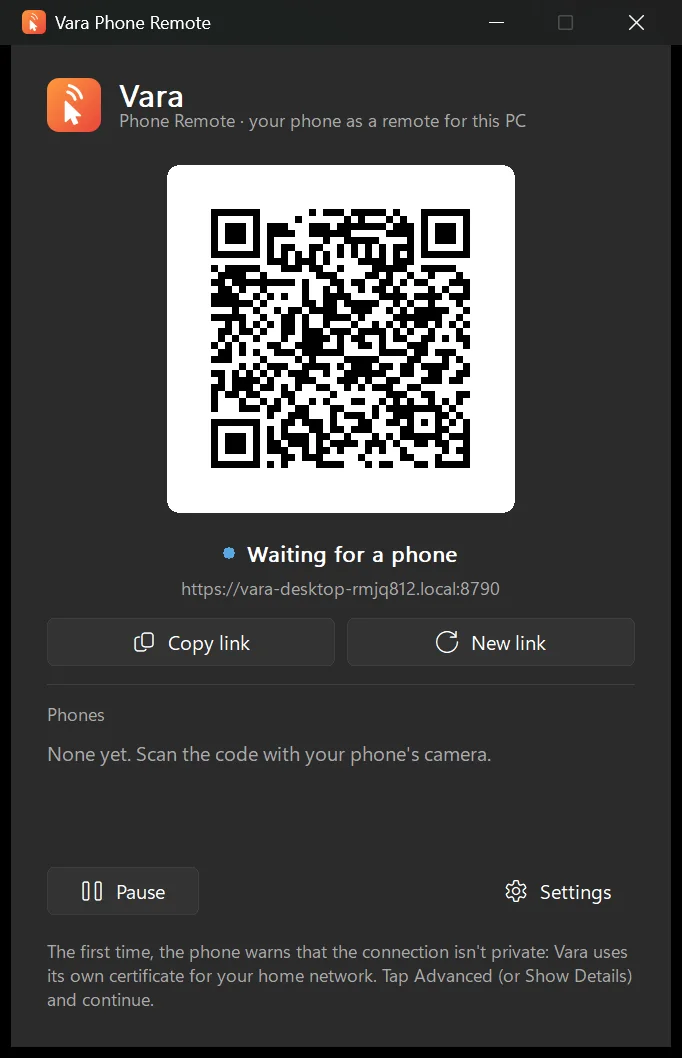
    Use your phone as a remote for your PC; point it at the screen and the pointer follows.

    • Pointer mode. Aim the top of the phone at the screen and the pointer goes where you point. A for click, B for right click, a strip to scroll.
    • Presentations. A red laser dot or a spotlight moved by the phone, plus buttons for the previous and next slide.
    • Touchpad mode. Move, tap, drag and two-finger scroll, with Esc, Alt+Tab, Start and Enter at hand.
    3 releases
    v0.1.2 · Nov 23, 2026

    Or download Vara on its own · v0.1.2 · 2.4 MB

    Vara runs on your Windows PC; your phone becomes the remote from its browser. Open this page on your PC to install. Or download the installer anyway · 2.3 MB.

    Vara's window on the PC with a QR code waiting for a phone, buttons to copy the link or make a new one, and the list of phones
    Video coming soon
  • Security · Tray app

    Obex Password Vault

    Your passwords in one encrypted file on your PC, unlocked with Windows Hello.

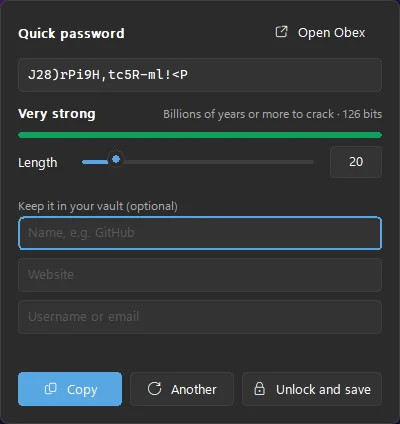
    • Quick password anywhere. Ctrl+Alt+O pops up a new password with its strength. Copy it, or add a name and username to save it right away.
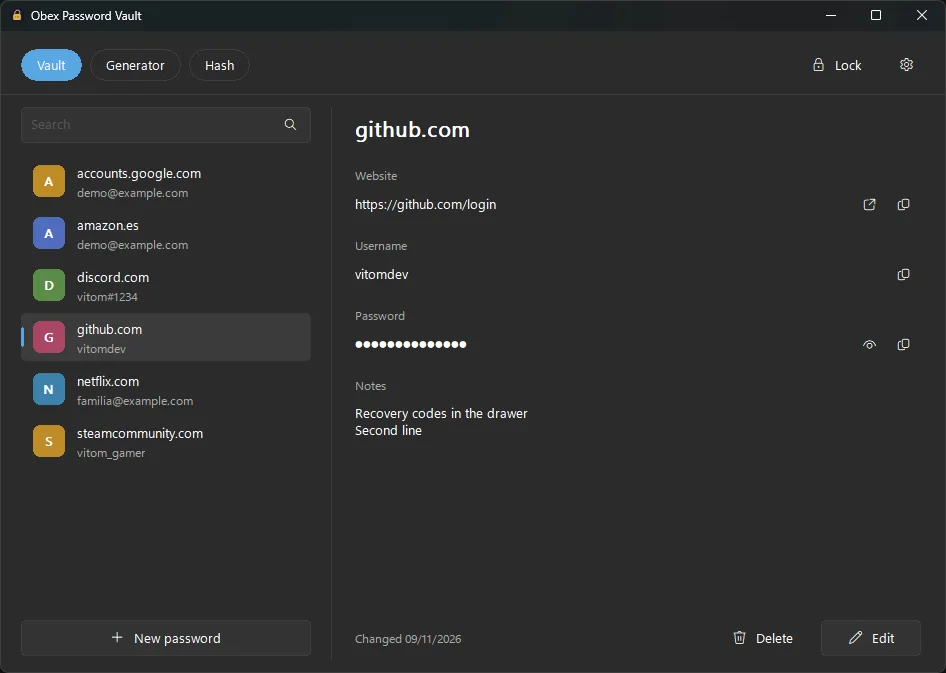
    • Find and copy. Search as you type across names, websites, usernames and notes. Copied passwords clear from the clipboard after 30 seconds and stay out of clipboard history.
    • Strong encryption. AES-256-GCM and PBKDF2-SHA256 with 600,000 rounds, all with Windows' own cryptography. No third-party crypto code.
    Quick password
    CtrlAltO
    3 releases
    v1.0.2 · Nov 23, 2026

    Or download Obex on its own · v1.0.2 · 2.2 MB

    Vitool Box and its apps run on Windows 10 and 11. Open this page on your PC to install. Or download the installer anyway · 2.3 MB.

    Obex's quick password panel with a generated password rated very strong, a length slider and fields to save it to the vaultObex's vault window listing saved accounts on the left and the selected entry's website, username, password and notes
    Video coming soon
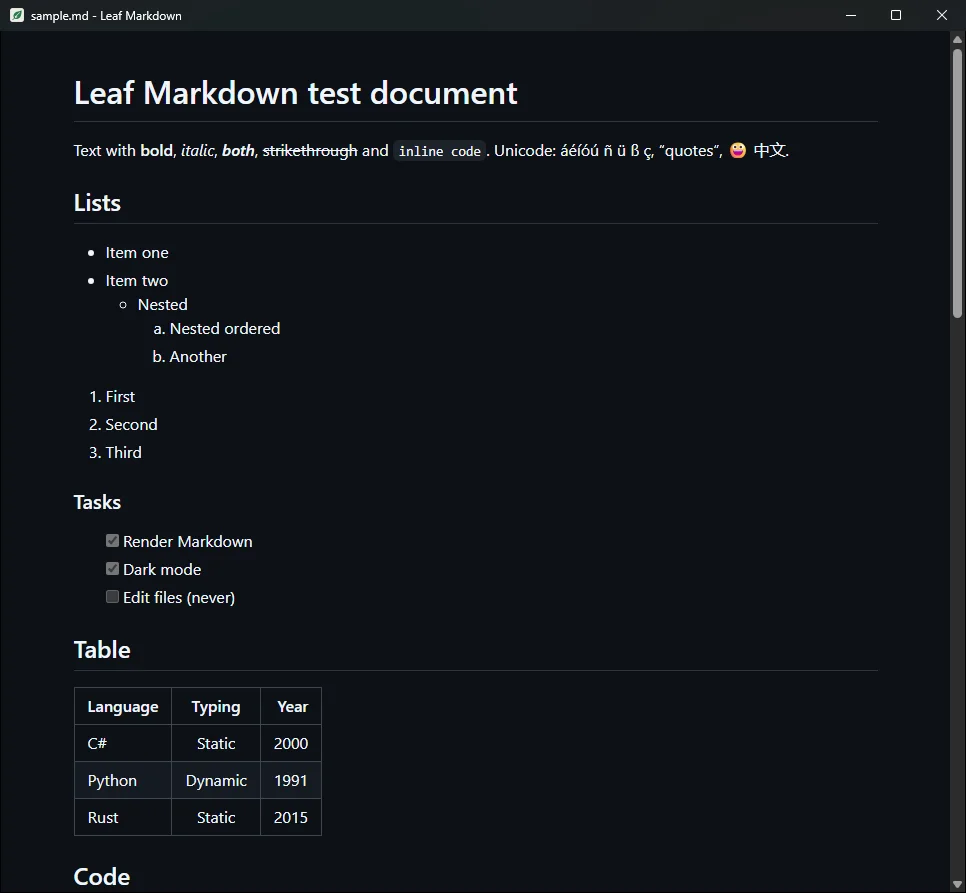
  • Writing · Desktop app

    Leaf Markdown

    Open .md files beautifully rendered, like a PDF reader for Markdown.

    • GitHub-style rendering. Tables, task lists, footnotes, alerts, images and syntax-highlighted code.
    • Live reload. When another program saves the file, the view updates and keeps your reading position.
    • Opens your way. Double-click, drag and drop, Ctrl+O or the command line.
    Open a file
    CtrlO
    2 releases
    v1.0.1 · Nov 23, 2026

    Or download Leaf on its own · v1.0.1 · 3.0 MB

    Vitool Box and its apps run on Windows 10 and 11. Open this page on your PC to install. Or download the installer anyway · 2.3 MB.
    Leaf Markdown in dark mode rendering a test document with formatted text, nested lists, task lists and a table
    Video coming soon

Vitool Box

Every app, one switch away.

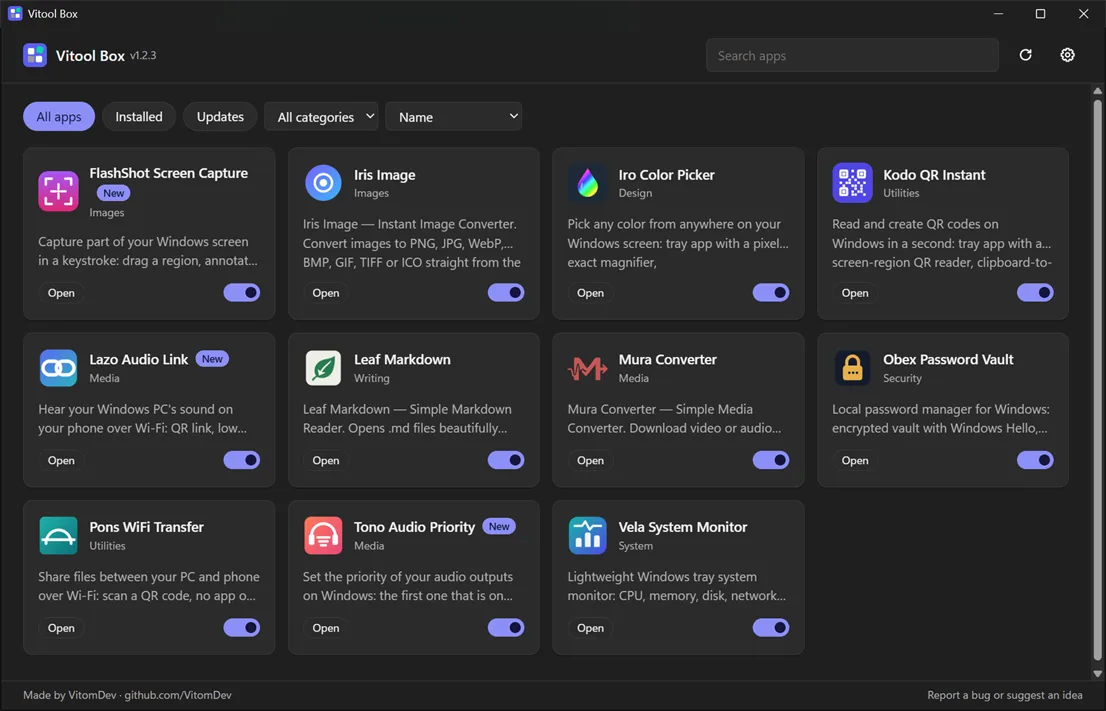
Every app on this site in one place. Browse them, read what each one does, and turn on the ones you want. Vitool Box downloads, checks and installs them, keeps them updated and can group their tray icons into one.

  • Turn apps on and off. On downloads and installs the app; off uninstalls it. No setup wizards.
  • One-click updates. Update one app from its card, or all of them at once. New apps show up on their own.
  • Safe downloads. Only official releases, each checked against its SHA-256 checksum before it runs.

Vitool Box and its apps run on Windows 10 and 11. Open this page on your PC to install. Or download the installer anyway · 2.3 MB.

Prefer just one or two? Every app also downloads on its own fromGitHub.

Vitool Box showing the app catalog as cards with icons, descriptions and install switches, with filters for installed apps, updates and category

Made by one developer, one small tool at a time.

Vitool Box is a collection of independent Windows apps by Vitom, a developer of software and games. Each one solves a small, specific problem: a color to pick, a QR code to read, sound that goes to the wrong headphones.

Instead of one app that does everything, each tool does its one job well and keeps its own name and icon.

More from Vitom at vitom.dev
  1. Free and open source

    Every app is free, with its code on GitHub under the MIT license. If someone charged you for one, you were scammed.

  2. No accounts, no telemetry

    Nothing to sign up for and nothing reported back. An app only goes online when its feature needs it, like a download.

  3. Light on purpose

    Most installers are around 2 MB, and the tray apps wait in the notification area using next to no memory and no CPU.

  4. At home on Windows 11

    They follow your light or dark theme and accent color, and most install for your user alone, without admin rights.