

MediaDesktop app
Mura Converter
Paste a link and download the video or just the audio, in the format you need.
Vitool Box and its apps run on Windows 10 and 11. Open this page on your PC to install. Or download the installer anyway · 2.3 MB.
Overview
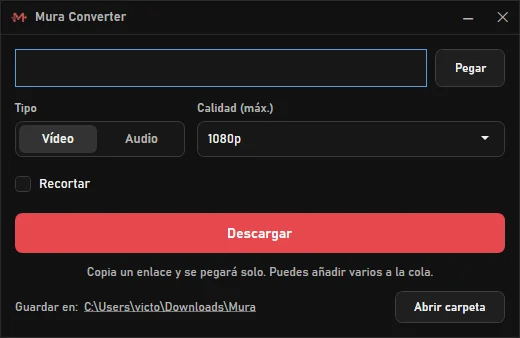
A simple media converter for Windows. Paste a link from YouTube, TikTok, Instagram, SoundCloud and many more sites, preview it, trim it if you like, and download it as MP4, MKV or WebM video or MP3, M4A, Opus or WAV audio.
Mura auto-pastes copied links when it opens or gets focus, so most downloads are one click. MP4 files prefer H.264 and AAC so they play everywhere, and nothing is re-encoded, which keeps it fast.
It remembers your format, quality and output folder, and a Windows notification tells you when a background download is done.
Mura is meant for personal use. Respect each site's terms and only download content you have the right to.
What it does
Video or audio
MP4, MKV or WebM up to 4K, or MP3, M4A, Opus and lossless WAV.
Preview first
Thumbnail, title, channel and duration before you download.
Queue and playlists
Paste several links in a row, or a whole playlist into its own numbered folder.
Trim
Pick a section with a two-handle bar or type the times; only that part is downloaded.
From the right-click menu
Download copied link with Mura saves the copied link straight into that folder, without opening the window.
Keeps working
Powered by bundled yt-dlp and FFmpeg, updated daily so downloads keep working when sites change.
Install
With Vitool Box Recommended
Install Vitool Box, open it and turn Mura on. It installs every app with a switch and keeps them all up to date.
 Get it with Vitool Box: downloads the Vitool Box installer, then turn Mura on with a switch
On its own
Download
MuraSetup.exefrom the latest release and run it.- Per-user install, no admin rights and no .NET needed.
- Optional: installing Deno lets yt-dlp see every YouTube format; Mura picks it up automatically.
Changelog
All releasesv2.3.1Latest
v2.3.1 on GitHubOfficial and free 💸
- 🏷️ Trademarks: new TRADEMARKS.md. The code stays MIT, but the Mura name and logo are not part of the license: forks need their own name and icon, and nobody may sell Mura as the official app
- 💸 Free app notice: the installer's license page now says that Mura is free and only published at github.com/VitomDev, so anyone who was charged for it knows they were scammed
Install: download
MuraSetup.exebelow and run it; it upgrades your current Mura and keeps your settings.v2.3.0
v2.3.0 on GitHub✨ Novedades
- ✂️ Recorte con barra de dos asas: elige inicio y final arrastrando, o escribe los tiempos a mano. Muestra la duración del recorte.
- ⌨️ Ajuste fino con las flechas (Shift = 10 s) y burbuja con el tiempo al arrastrar.
- 🎞️ Formato de vídeo: MP4, MKV o WebM, sin recodificar.
- 📋 La cola muestra el tramo recortado de cada descarga.
v2.2.0
v2.2.0 on GitHubMura Converter 2.2.0 ⚡ Lighter at idle
- 🪶 Uses about half the memory with the window open (private memory 84 → 47 MB) and about half the CPU while idle
- 📉 Minimized and idle, it gives memory back to Windows: ~20 MB instead of ~136 MB
- 🧵 Fewer background threads (23 → 18)
Nothing changes in how you use it: same window, same downloads.
Install: download
MuraConverter-Setup-2.2.0.exebelow and run it. It updates your current installation.


