
SecurityTray app
Obex Password Vault
Your passwords in one encrypted file on your PC, unlocked with Windows Hello.
Vitool Box and its apps run on Windows 10 and 11. Open this page on your PC to install. Or download the installer anyway · 2.3 MB.
Overview
A local password manager for Windows. Unlock it with Windows Hello, find any password in a second and copy it with one click. Press Ctrl+Alt+O anywhere for a new strong password and save it to your vault in the same step. No accounts, no cloud, no telemetry.
Obex, Latin for bolt or barrier, keeps your passwords in one encrypted file that never leaves your PC. It lives in the notification area and works completely offline.
What it does
Quick password anywhere
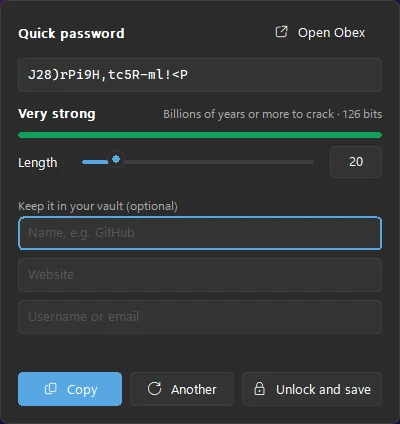
Ctrl+Alt+O pops up a new password with its strength. Copy it, or add a name and username to save it right away.
Find and copy
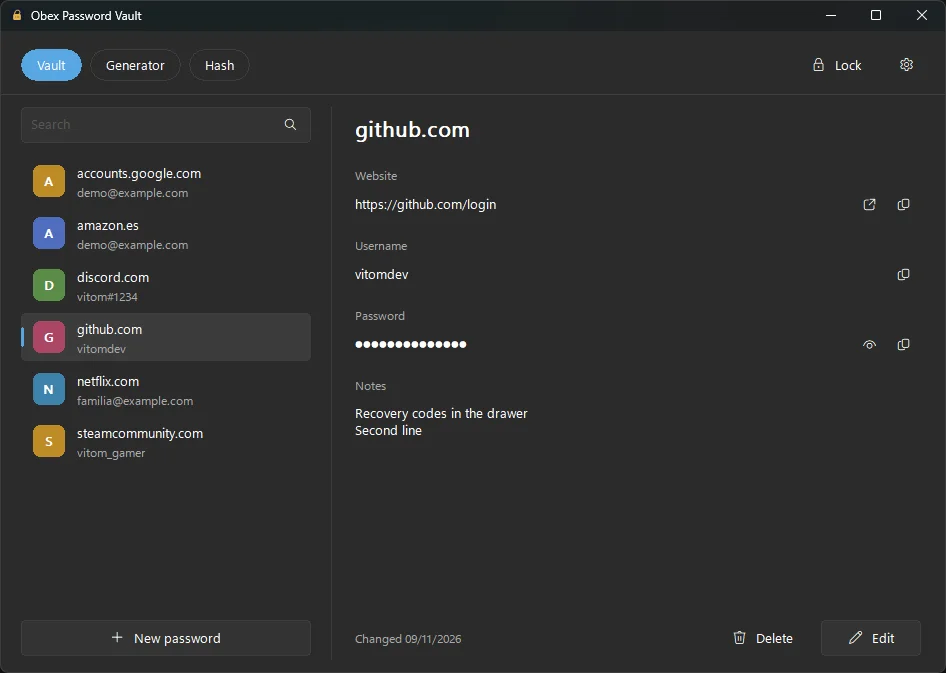
Search as you type across names, websites, usernames and notes. Copied passwords clear from the clipboard after 30 seconds and stay out of clipboard history.
Strong encryption
AES-256-GCM and PBKDF2-SHA256 with 600,000 rounds, all with Windows' own cryptography. No third-party crypto code.
Windows Hello
Unlock with your PIN, fingerprint or face. The master password is still asked after every restart and at least once a week.
Recovery code
A one-time code gets you back in if you forget the master password. Print it or save it as an emergency sheet.
Generator and hash tools
Passwords from 4 to 128 characters with a crack-time estimate, plus MD5, SHA-1, SHA-256 and SHA-512 for any text or file.
Import and export
Bring in the passwords you exported from Chrome or Edge, and export them back to CSV.
Auto-lock
Locks after 15 minutes without use, and whenever you lock Windows or the PC sleeps.
Shortcuts
| Action | Keys |
|---|---|
| Quick password | CtrlAltO |
Install
With Vitool Box Recommended
Install Vitool Box, open it and turn Obex on. It installs every app with a switch and keeps them all up to date.
 Get it with Vitool Box: downloads the Vitool Box installer, then turn Obex on with a switch
On its own
Download
ObexSetup.exefrom the latest release and run it.- Per-user install, no admin rights needed.
- Obex opens right away to create your vault, and starts with Windows from then on.
- Uninstalling keeps your vault and its backups, so reinstalling brings everything back.
Changelog
All releasesv1.0.2Latest
v1.0.2 on GitHubOfficial and free 💸
- 🏷️ Trademarks: new TRADEMARKS.md. The code stays MIT, but the Obex name and logo are not part of the license: forks need their own name and icon, and nobody may sell Obex as the official app
- 💸 Free app notice: the installer's license page now says that Obex is free and only published at github.com/VitomDev, so anyone who was charged for it knows they were scammed
- 🪪 Settings footer: now reads Free and open source next to the version
Install: download
ObexSetup.exebelow and run it; it upgrades your current Obex and keeps your settings.v1.0.1
v1.0.1 on GitHubFits inside Vitool Box 🗃️
- 🗃️ Grouped icon: when Group my apps' icons is on in Vitool Box, Obex's icon moves inside the Vitool Box icon next to the clock. Click it there to use Obex, right-click it for its usual menu
- 🔁 Without Vitool Box, or with the option off, Obex keeps its own icon exactly as before
Install: download
ObexSetup.exebelow and run it; it upgrades your current Obex and keeps your settings.v1.0.0
v1.0.0 on GitHubFirst release of Obex Password Vault 🔐
- 🗄️ Encrypted vault in one local file: AES-256-GCM and PBKDF2 with Windows' own cryptography. Search, copy usernames and passwords with one click; the clipboard clears itself after 30 seconds and stays out of
Win + V - 👆 Windows Hello unlock (PIN, fingerprint or face); the master password is asked after every restart and at least once a week
- 🆘 Recovery code with a printable emergency sheet, in case you forget your master password
- ⚡ Quick password with
Ctrl + Alt + O: a new password in the corner of the screen, ready to copy or to save in your vault with a name, website and username - 🎲 Password generator (4–128 characters, look-alike filter, strength meter) and #️⃣ hash tools (MD5, SHA-1, SHA-256, SHA-512,
.sha256checks) - 📥 Import from Chrome or Edge, export to CSV, daily encrypted backups
- ⏱️ Auto-lock after inactivity, when Windows locks or the PC sleeps
- 🔒 100% offline: no accounts, no cloud, no telemetry
Install: download
ObexSetup.exebelow and run it. Per-user install, no admin rights needed. Windows 10 (1809+) and 11, 64-bit.- 🗄️ Encrypted vault in one local file: AES-256-GCM and PBKDF2 with Windows' own cryptography. Search, copy usernames and passwords with one click; the clipboard clears itself after 30 seconds and stays out of


