

SystemTray app
Vela System Monitor
CPU, GPU, memory, disk, network and battery in your tray, without opening Task Manager.
Vitool Box and its apps run on Windows 10 and 11. Open this page on your PC to install. Or download the installer anyway · 2.3 MB.
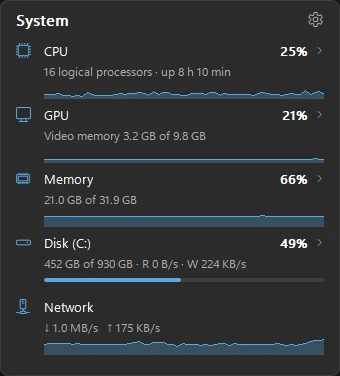

The same numbers, right on the taskbar.
Overview
CPU and memory live in the tray icon, a tooltip sums up everything and one click opens a small panel with history graphs and the top processes. Want the numbers always in sight? Put them on the taskbar or in a floating widget.
Vela keeps an eye on your PC so you do not have to open Task Manager. CPU, GPU, memory, disk, network and battery, from a glance at the tray to the processes behind a spike.
What it does
Tray icon
The Vela logo, or the live CPU or memory percent as a number.
Panel
A Windows 11 style flyout with every metric, a level bar and its recent history.
Top processes
Click CPU, GPU, Memory or Disk to see the 10 apps using the most, then end one or find its file.
On the taskbar or floating
The numbers blended into your taskbar, or in a tiny always-on-top widget you can drag anywhere.
High usage warnings
An optional notification when CPU, GPU or memory stay at 90 percent or more.
Only what you care about
Pick which metrics appear in the panel, the taskbar and the widget.
Out of the way
Stops sampling while the screen is off. A monitor that eats your resources would defeat its own purpose.
Install
With Vitool Box Recommended
Install Vitool Box, open it and turn Vela on. It installs every app with a switch and keeps them all up to date.
 Get it with Vitool Box: downloads the Vitool Box installer, then turn Vela on with a switch
On its own
Download
VelaSetup.exefrom the latest release and run it.- Per-user install, no admin rights needed.
- Vela starts right away in the notification area and starts with Windows from then on.
Changelog
All releasesv1.5.5Latest
v1.5.5 on GitHubOfficial and free 💸
- 🏷️ Trademarks: new TRADEMARKS.md. The code stays MIT, but the Vela name and logo are not part of the license: forks need their own name and icon, and nobody may sell Vela as the official app
- 💸 Free app notice: the installer's license page now says that Vela is free and only published at github.com/VitomDev, so anyone who was charged for it knows they were scammed
Install: download
VelaSetup.exebelow and run it; it upgrades your current Vela and keeps your settings.v1.5.4
v1.5.4 on GitHubIcon back in one piece 🩹
- 🩹 Fixed: after turning off Group my apps' icons in Vitool Box, or quitting Vitool Box, Vela's icon came back blank next to the clock. It now comes back with its usual live icon
Install: download
VelaSetup.exebelow and run it; it upgrades your current Vela and keeps your settings.v1.5.3
v1.5.3 on GitHubFits inside Vitool Box 🗃️
- 🗃️ Grouped icon: when Group my apps' icons is on in Vitool Box, Vela's icon moves inside the Vitool Box icon next to the clock. Click it there to use Vela, right-click it for its usual menu
- 🔁 Without Vitool Box, or with the option off, Vela keeps its own icon exactly as before
Install: download
VelaSetup.exebelow and run it; it upgrades your current Vela and keeps your settings.v1.5.2
v1.5.2 on GitHubPick your screens 🖥️🖥️
- ⚙️ Taskbar on screens: with more than one screen, choose which taskbars show Vela's numbers (one, several or all), right in Settings
- 🔌 Plugging or unplugging a screen is picked up on its own
Install: download
VelaSetup.exebelow and run it; it upgrades your current Vela and keeps your settings.v1.5.1
v1.5.1 on GitHubShow or hide the graphs 📉
- ⚙️ New setting: History graphs in the panel. On by default; turn it off for plain bars
- 🖼️ Updated screenshot
Install: download
VelaSetup.exebelow and run it; it upgrades your current Vela and keeps your settings.v1.5.0
v1.5.0 on GitHubGPU, history graphs and more 🎮📉
- 🎮 GPU: usage (as Task Manager measures it) and video memory in the panel; click it for the top 10 processes by GPU. Also available on the taskbar and floating widget
- 📉 History graphs: CPU, GPU, memory and network draw their recent past in the panel
- 🛑 Right-click a process in a top list to end it or open its file location
- 🚨 High usage warnings (optional, in Settings): a notification when CPU, GPU or memory stay at 90% or more; click it to see what is using it
- 🪶 The GPU is only read while something shows it
Install: download
VelaSetup.exebelow and run it; it upgrades your current Vela and keeps your settings.


