
ToolsTray appIn development
Vara Phone Remote
Use your phone as a remote for your PC; point it at the screen and the pointer follows.
Vara runs on your Windows PC; your phone becomes the remote from its browser. Open this page on your PC to install. Or download the installer anyway · 2.3 MB.
Overview
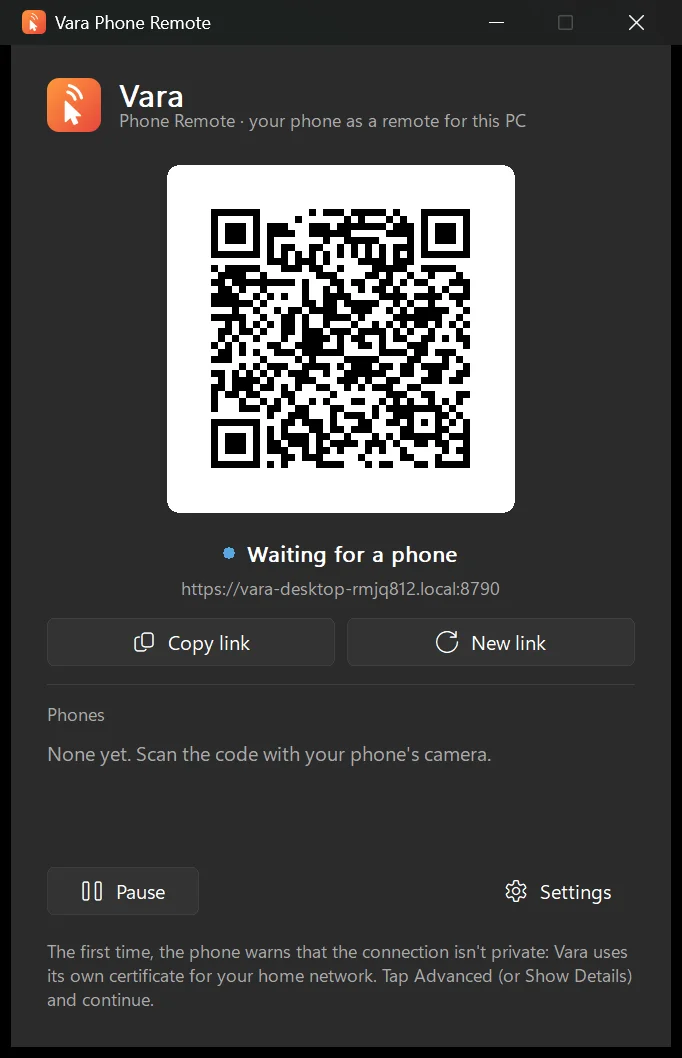
Scan a QR code and your phone becomes a remote for your PC from its browser. Point it at the screen like a motion remote, or use it as a touchpad and keyboard, with media keys, a presentation laser and power controls. Nothing to install on the phone.
Vara turns the phone in your pocket into a remote for the PC across the room: a motion pointer like a game console’s, a touchpad, a keyboard and media keys, all from a page in the phone’s browser.
The first version works and more features are on the way.
What it does
Pointer mode
Aim the top of the phone at the screen and the pointer goes where you point. A for click, B for right click, a strip to scroll.
Presentations
A red laser dot or a spotlight moved by the phone, plus buttons for the previous and next slide.
Touchpad mode
Move, tap, drag and two-finger scroll, with Esc, Alt+Tab, Start and Enter at hand.
Keyboard
Type on the phone and the text appears on the PC as you write, in any language.
Media and power
Play, pause, volume and mute, plus lock, screen off, sleep, restart or shut down with a confirmation.
Private by design
A new phone must be allowed on the PC the first time, and every connection needs the secret key in the QR code.
Install
With Vitool Box Recommended
Install Vitool Box, open it and turn Vara on. It installs every app with a switch and keeps them all up to date.
 Get it with Vitool Box: downloads the Vitool Box installer, then turn Vara on with a switch
On its own
Download
VaraSetup.exefrom the latest release and run it.- Per-user install, no admin rights needed. Vara starts with Windows so the phone can connect whenever the PC is on.
- The first time Vara starts, Windows Firewall asks whether it may use the network. Allow it on private networks.
Changelog
All releasesv0.1.2Latest
v0.1.2 on GitHubOfficial and free 💸
- 🏷️ Trademarks: new TRADEMARKS.md. The code stays MIT, but the Vara name and logo are not part of the license: forks need their own name and icon, and nobody may sell Vara as the official app
- 💸 Free app notice: the installer's license page now says that Vara is free and only published at github.com/VitomDev, so anyone who was charged for it knows they were scammed
Install: download
VaraSetup.exebelow and run it; it upgrades your current Vara and keeps your settings.v0.1.1
v0.1.1 on GitHubClose or keep running 🚪
- 🪟 Closing the window asks: keep Vara running in the background (phones can still connect) or exit it
- ☑️ Don't ask again remembers your choice; turn the question back on in Settings
- ⌨️ Esc just puts the window away, Vara keeps running
Install: download VaraSetup.exe and run it (per-user, no admin), or update from Vitool Box. Your settings and allowed phones are kept.
v0.1.0
v0.1.0 on GitHubYour phone as a remote for your PC 🪄
- 🎯 Point at the screen: the pointer goes where the phone points, like a game console's motion remote. A five-point calibration learns how your phone's gyroscope works and how far you turn to each edge
- 🔴 Laser and spotlight for presentations, with ◀ ▶ for slides
- 🖐️ Touchpad: move, tap to click, drag, two-finger scroll and right click
- ⌨️ Keyboard: type on the phone and the text appears on the PC, in any language and with emoji, plus the arrows, Enter, Esc and more
- 🎵 Media and volume keys, and 💤 lock, screen off, sleep, restart or shut down
- 🔒 Private: every new phone must be allowed on the PC, secret link with New link, encrypted (HTTPS), private network only
Install: download VaraSetup.exe and run it (per-user, no admin). The first time, allow Vara on Private networks when Windows Firewall asks, and on the phone tap Advanced → Proceed at the certificate warning.


