

ImagesTray app
FlashShot Screen Capture
Capture part of your screen in a keystroke, mark it up and copy or save it.
Vitool Box and its apps run on Windows 10 and 11. Open this page on your PC to install. Or download the installer anyway · 2.3 MB.
Overview
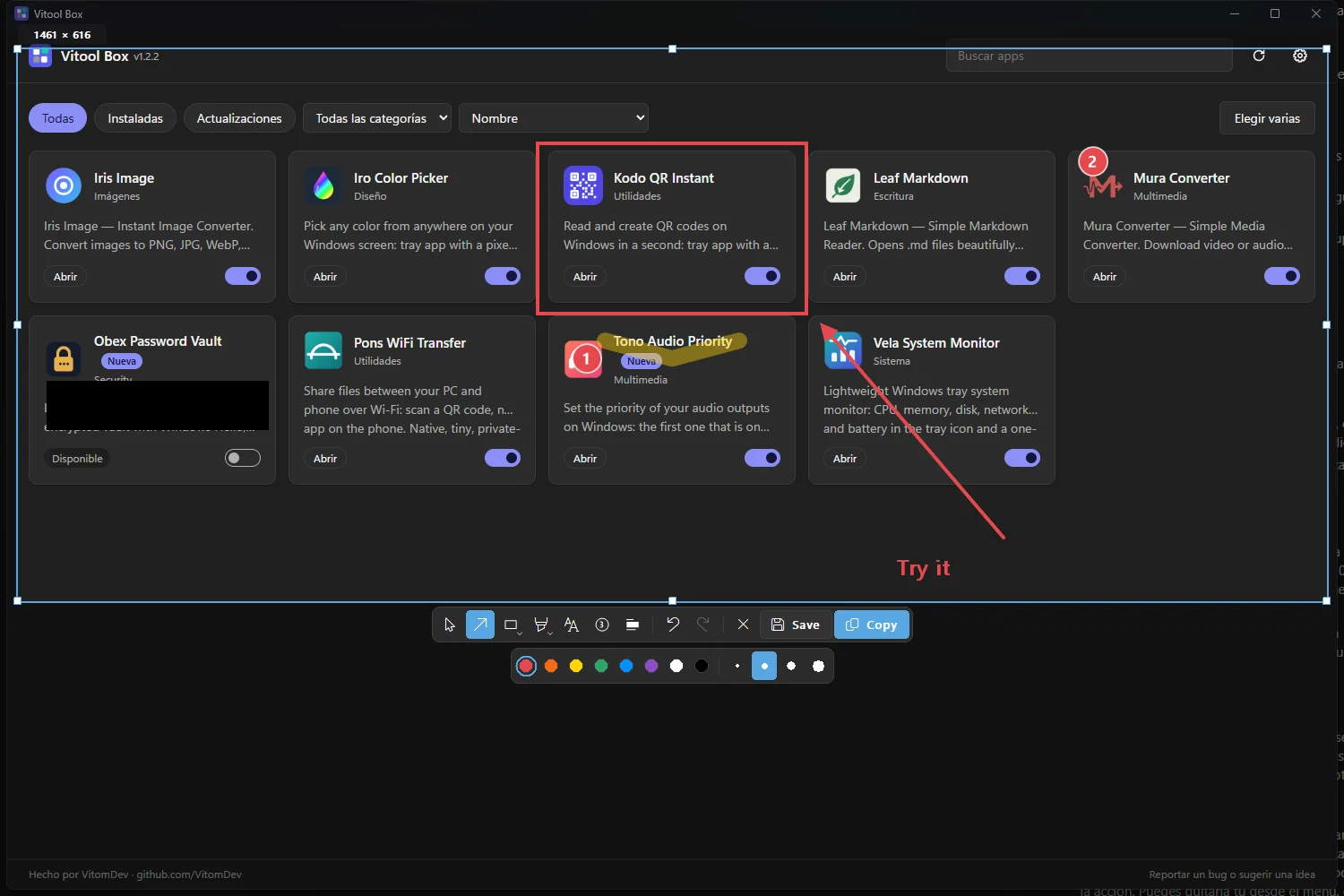
Press Print Screen, drag over part of the screen and annotate it with arrows, text, numbers and censor boxes right on top of the frozen screen. Copy it or save it. No editor window, no account, no upload.
FlashShot is a screenshot tool that skips the editor window. Press a key, drag over the part of the screen you need, mark it up and copy it or save it. Everything happens right on top of the frozen screen and stays on your PC.
It is tiny: a program of about 0.4 MB that needs no .NET or Visual C++ runtime and uses no CPU while it waits.
What it does
One shortcut from any app
Print Screen by default, even on Windows 11 where it normally opens the Snipping Tool. Change it in Settings.
A frozen screen
The desktop is captured first, so videos and animations stop while you select.
Precise regions
Drag in any direction, resize from corners and edges, nudge one pixel at a time with the arrow keys and read the live size in pixels.
Annotations that stay editable
Arrows, lines, rectangles, ellipses, pen, marker, text and numbered steps. Select, move, resize or recolor any of them until you export.
Censor boxes that really hide
An opaque box whose hidden pixels are not in the exported image at all.
Copy, save or both
Ctrl+C to the clipboard, save as PNG or JPEG, or Ctrl+S straight to the last folder with a dated name. Ctrl+drag copies the moment you let go.
Every monitor
Selections can cross screens, including monitors left of or above the main one and mixed scaling.
Undo everything
Undo and redo every drawing, move, resize, style change and text edit.
Shortcuts
| Action | Keys |
|---|---|
| New capture | Print Screen |
| Copy as soon as you release | Ctrldrag |
| Copy the capture | CtrlC |
| Save to the last folder | CtrlS |
| Close the capture | Esc |
Install
With Vitool Box Recommended
Install Vitool Box, open it and turn FlashShot on. It installs every app with a switch and keeps them all up to date.
 Get it with Vitool Box: downloads the Vitool Box installer, then turn FlashShot on with a switch
On its own
Download
FlashShotSetup.exefrom the latest release and run it.- Per-user install, no admin rights needed.
- FlashShot opens a small window with New capture and Settings, then keeps running in the notification area and starts with Windows.
- Alt+Print Screen, Win+Print Screen and Win+Shift+S keep doing what Windows does.
Changelog
All releasesv1.0.3Latest
v1.0.3 on GitHubOfficial and free 💸
- 🏷️ Trademarks: new TRADEMARKS.md. The code stays MIT, but the FlashShot name and logo are not part of the license: forks need their own name and icon, and nobody may sell FlashShot as the official app
- 💸 Free app notice: the installer's license page now says that FlashShot is free and only published at github.com/VitomDev, so anyone who was charged for it knows they were scammed
Install: download
FlashShotSetup.exebelow and run it; it upgrades your current FlashShot and keeps your settings.v1.0.2
v1.0.2 on GitHubPrint Screen belongs to FlashShot again ⌨️
- 📸 Print Screen just works: on Windows 11, where Print Screen opens the Snipping Tool by default, FlashShot now gets the key first. Nothing to turn off in Windows Settings
- 🎛️ Only Print Screen on its own: Alt+Print Screen, Win+Print Screen and Win+Shift+S keep doing what Windows does, and every other key is left alone
- ⚙️ Settings records Print Screen again, even with the Snipping Tool option on
- 🔔 Honest warning: if Print Screen still cannot reach FlashShot, it now tells you instead of staying silent
Install: download
FlashShotSetup.exebelow and run it; it upgrades your current FlashShot and keeps your settings.v1.0.1
v1.0.1 on GitHubFits inside Vitool Box 🗃️
- 🗃️ Grouped icon: when Group my apps' icons is on in Vitool Box, FlashShot's icon moves inside the Vitool Box icon next to the clock. Click it there to use FlashShot, right-click it for its usual menu
- 🔁 Without Vitool Box, or with the option off, FlashShot keeps its own icon exactly as before
Install: download
FlashShotSetup.exebelow and run it; it upgrades your current FlashShot and keeps your settings.v1.0.0
v1.0.0 on GitHubFirst release of FlashShot Screen Capture 📸
- ⌨️ One key from any app: Print Screen by default (change it in Settings), freezes every monitor and lets you drag a region
- ✂️ Precise region: any drag direction, resize from corners and edges, move it with the arrow keys, live size in pixels, across monitors
- ✏️ Annotations that stay editable: arrow, line, rectangle, ellipse, pen, marker, text, numbering and opaque censor boxes, with undo and redo
- 📋 Copy (Ctrl+C) or Save as PNG or JPEG; Ctrl+S saves straight to the last folder, Ctrl+drag copies on release
- 🔒 100% offline, no dependencies, ~0 CPU while waiting
Install: download
FlashShotSetup.exebelow and run it. Per-user install, no admin rights needed. Windows 10 (1809+) and 11, 64-bit.


