

DesignTray app
Iro Color Picker
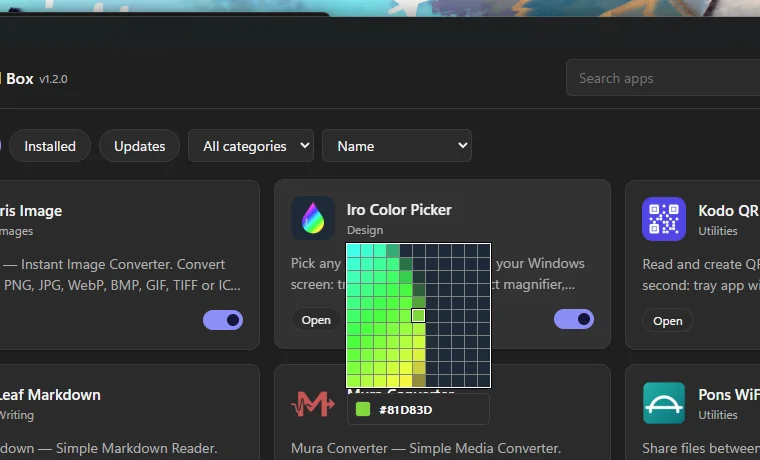
Pick any color from anywhere on your screen with a pixel-exact magnifier.
Vitool Box and its apps run on Windows 10 and 11. Open this page on your PC to install. Or download the installer anyway · 2.3 MB.
Overview
Press Ctrl+Alt+C, point at a pixel with the magnifier over a frozen copy of the screen and click. The color is on your clipboard as HEX, RGB, HSL, HSV, CMYK or plain numbers, and your last 24 colors stay one click away.
Iro lives in the notification area and waits for its shortcut. Press it, hit the exact pixel you want and the color is already copied in the format you use.
It works offline, uses about half a megabyte of memory and no CPU at all while idle.
What it does
Pixel-exact picking
A magnifier follows your pointer over a frozen copy of the screen. Zoom with the mouse wheel and move one pixel at a time with the arrow keys.
The format you need
HEX, RGB, HSL, HSV, CMYK or plain R, G, B. Choose the default and the magnifier shows it as you go.
Recent colors
Your last 24 colors in the tray menu and in the Colors window.
Colors window
The selected color large, in every format, each with its own copy button.
Every monitor
Multiple monitors, mixed DPI scaling and screens placed left of or above the main one.
Shortcuts
| Action | Keys |
|---|---|
| Pick a color | CtrlAltC |
| Move one pixel (ten with Shift) | Arrow keys |
| Zoom the magnifier | Mouse wheel |
| Cancel | Esc |
How light it is
- Idle CPU (60 s)
- 0 ms
- Idle memory
- 0.5 MB working set
- Program / installer
- 0.4 MB / 2.2 MB
Measured on the developer's PC with Windows 11.
Install
With Vitool Box Recommended
Install Vitool Box, open it and turn Iro on. It installs every app with a switch and keeps them all up to date.
 Get it with Vitool Box: downloads the Vitool Box installer, then turn Iro on with a switch
On its own
Download
IroSetup.exefrom the latest release and run it.- Per-user install, no admin rights needed.
- Iro starts right away in the notification area and starts with Windows from then on.
Changelog
All releasesv1.0.2Latest
v1.0.2 on GitHubOfficial and free 💸
- 🏷️ Trademarks: new TRADEMARKS.md. The code stays MIT, but the Iro name and logo are not part of the license: forks need their own name and icon, and nobody may sell Iro as the official app
- 💸 Free app notice: the installer's license page now says that Iro is free and only published at github.com/VitomDev, so anyone who was charged for it knows they were scammed
Install: download
IroSetup.exebelow and run it; it upgrades your current Iro and keeps your settings.v1.0.1
v1.0.1 on GitHubFits inside Vitool Box 🗃️
- 🗃️ Grouped icon: when Group my apps' icons is on in Vitool Box, Iro's icon moves inside the Vitool Box icon next to the clock. Click it there to use Iro, right-click it for its usual menu
- 🔁 Without Vitool Box, or with the option off, Iro keeps its own icon exactly as before
Install: download
IroSetup.exebelow and run it; it upgrades your current Iro and keeps your settings.v1.0.0
v1.0.0 on GitHubFirst release of Iro Color Picker 🎨
- 💧 Pick a color anywhere on screen with
Ctrl + Alt + C: a magnifier follows the pointer for pixel-exact picks (mouse wheel to zoom, arrow keys to move one pixel) - 🧾 Copies as HEX, RGB, HSL, HSV, CMYK or plain
R, G, B, your choice - 🕘 Recent colors in the tray menu and in the Colors window, with every format one click away
- 🔒 100% offline, ~0.5 MB of memory while idle, no dependencies
Install: download
IroSetup.exebelow and run it. Per-user install, no admin rights needed. Windows 10 (1809+) and 11, 64-bit.- 💧 Pick a color anywhere on screen with


