

UtilitiesTray app
Kodo QR Instant
Read a QR code from anywhere on your screen, or turn your clipboard into one.
Vitool Box and its apps run on Windows 10 and 11. Open this page on your PC to install. Or download the installer anyway · 2.3 MB.
Overview
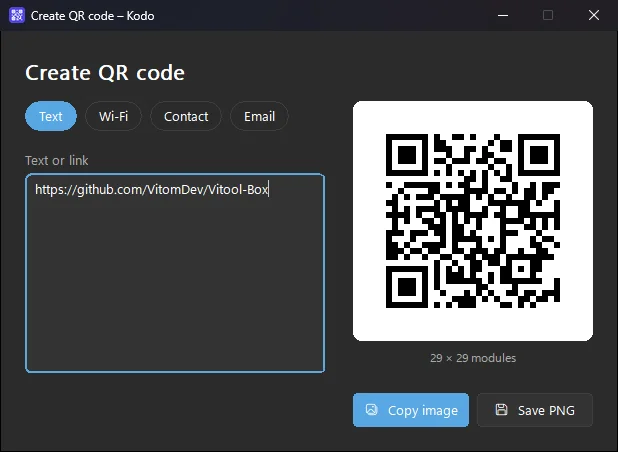
Press a shortcut and drag over a QR code anywhere on screen to see what it holds, read one with your webcam, or create a code from your clipboard, a Wi-Fi network, a contact or an email, ready to scan with your phone.
Kodo reads and creates QR codes on your PC in a second. It understands accents, emoji and any alphabet, and reads dark-mode, rotated and tiny on-screen codes.
Screenshots, camera images and codes never leave your PC. It lives in the notification area and uses almost no memory.
What it does
Read any on-screen code
Select an area and a small card shows what the code holds. Several codes in the selection? Step through them.
Safe links
Short links, look-alike addresses, bare IPs and unencrypted links get a warning before they open.
Wi-Fi, contacts and more
See a network's name and password, emails, phone numbers, text messages, contacts and locations.
Read with the camera
Hold a code up to your webcam and it is read the moment it comes into view.
Create from the clipboard
Copy any text or link, press the shortcut and the QR code is there. Copy the image or save it as PNG.
Templates and history
Codes for a Wi-Fi network, a contact card or an email with a live preview, plus a history with favorites that stays on your PC.
Shortcuts
| Action | Keys |
|---|---|
| Read a QR code on screen | CtrlShiftQ |
| Read with the camera | CtrlShiftAltQ |
| Create a QR from the clipboard | CtrlShiftG |
How light it is
- Idle CPU (60 s)
- 0 ms
- Idle memory
- 0.6 MB working set
- Program / installer
- 1.3 MB / 2.6 MB
Measured on the developer's PC with Windows 11.
Install
With Vitool Box Recommended
Install Vitool Box, open it and turn Kodo on. It installs every app with a switch and keeps them all up to date.
 Get it with Vitool Box: downloads the Vitool Box installer, then turn Kodo on with a switch
On its own
Download
KodoSetup.exefrom the latest release and run it.- Per-user install, no admin rights needed.
- Kodo starts right away in the notification area and starts with Windows from then on.
Changelog
All releasesv1.2.2Latest
v1.2.2 on GitHubOfficial and free 💸
- 🏷️ Trademarks: new TRADEMARKS.md. The code stays MIT, but the Kodo name and logo are not part of the license: forks need their own name and icon, and nobody may sell Kodo as the official app
- 💸 Free app notice: the installer's license page now says that Kodo is free and only published at github.com/VitomDev, so anyone who was charged for it knows they were scammed
Install: download
KodoSetup.exebelow and run it; it upgrades your current Kodo and keeps your settings.v1.2.1
v1.2.1 on GitHubFits inside Vitool Box 🗃️
- 🗃️ Grouped icon: when Group my apps' icons is on in Vitool Box, Kodo's icon moves inside the Vitool Box icon next to the clock. Click it there to use Kodo, right-click it for its usual menu
- 🔁 Without Vitool Box, or with the option off, Kodo keeps its own icon exactly as before
Install: download
KodoSetup.exebelow and run it; it upgrades your current Kodo and keeps your settings.v1.2.0
v1.2.0 on GitHubReading a QR code now feels like scanning one ✨
- ✨ Scan effect: when Kodo reads a code on your screen, a light sweeps over it, the frame glows and a few sparks fly off
- 🔊 A nicer sound: a soft glass chime replaces the old beep (you can still turn it off in Settings)
- ⭐ Favorite links open by themselves: scan a link you've marked as a favorite and it opens right away
Install: download
KodoSetup.exebelow and run it; it upgrades your current Kodo and keeps your settings.v1.1.0
v1.1.0 on GitHubKodo now reads QR codes with your camera too 📷
- 📷 Read with the camera (
Ctrl + Shift + Alt + Q): hold up a QR code on your phone, a ticket or a poster and it's read the moment it's in view. Choose the camera if you have several, and turn the mirror view on or off ⚠️ Safer links: short links (bit.ly…), look-alike addresses, bare IPs and unencrypted links get a warning, and opening them asks first- ⭐ Favorites in the history: keep the codes you reuse (your Wi-Fi, your contact card) on top
- 🔊 A short beep, and a green flash on the camera, when a code is read. You can turn the sound off in Settings
Install: download
KodoSetup.exebelow and run it; it upgrades your current Kodo and keeps your settings.- 📷 Read with the camera (
v1.0.0
v1.0.0 on GitHubFirst release of Kodo QR Instant 🔳
- 🔍 Read a QR code anywhere on screen with
Ctrl + Shift + Q: links (open/copy), Wi-Fi (network and password), text (copied to the clipboard), email, phone, SMS, contacts and locations - ✨ Create a QR code from the clipboard with
Ctrl + Shift + G, then copy it as an image or save it as PNG - 🧩 Templates for Wi-Fi, contacts (vCard) and email
- 🕘 Local history, which you can turn off or clear
- 🔒 100% offline, ~0.6 MB of memory while idle
Install: download
KodoSetup.exebelow and run it. Per-user install, no admin rights needed. Windows 10 (1809+) and 11, 64-bit.- 🔍 Read a QR code anywhere on screen with


